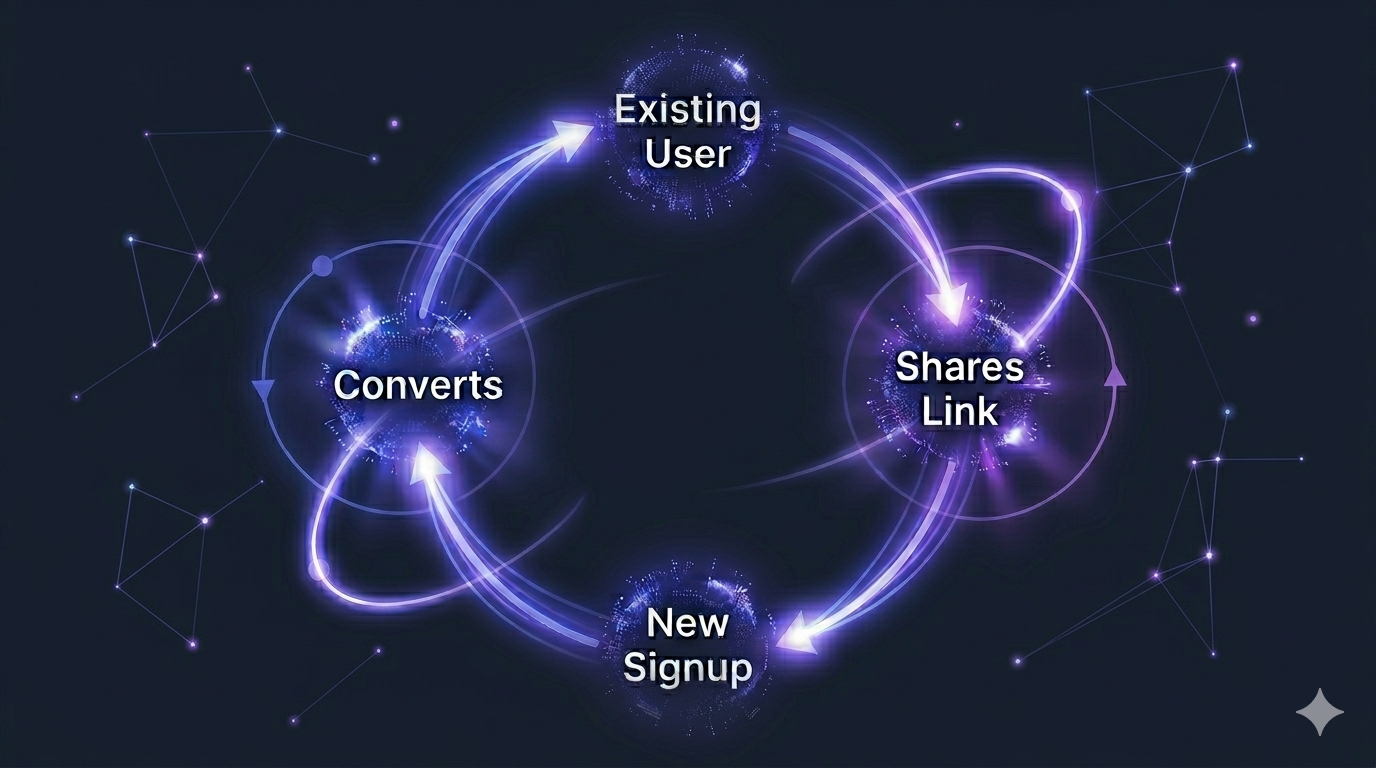
How to Build a Referral System in React: Technical Implementation + Business Strategy

How to Build a Referral System in React: Technical Implementation + Business Strategy
Every SaaS product eventually reaches the same inflection point: paid acquisition costs are climbing, organic growth is plateauing, and someone in a meeting says “we should do a referral program.” The idea gets added to the roadmap. Six months later it’s still not shipped because nobody agreed on the incentive structure, the engineering scope ballooned, and there was always something more urgent.
This guide eliminates both problems. The business decisions and the technical implementation, in one place, in the order you actually need to make them.
The Business Foundation: Decisions to Make Before Writing Code
Building the technical system before settling the business model is the most common mistake. You end up with infrastructure that doesn’t match your incentive structure, or worse, a referral program nobody uses because the rewards aren’t compelling enough to motivate sharing.
Decision 1: One-Sided vs. Double-Sided Incentives
One-sided — only the referrer gets rewarded. Common in B2B where the referrer is a trusted advisor and their recommendation carries enough weight on its own.
Double-sided — both the referrer and the new customer get rewarded. More friction to set up, but consistently outperforms one-sided programs in B2C and early-stage B2B SaaS. The new customer has a tangible reason to act on the recommendation instead of filing it away as “something to look at later.”
Rule of thumb: If your product is self-serve and the buying decision takes less than a week, use double-sided. If you have a longer sales cycle or the referrer’s credibility is the primary driver, one-sided works.
Decision 2: Cash Commission vs. Credits vs. Discount
| Reward Type | Best For | Risk |
|---|---|---|
| Cash commission (recurring) | B2B SaaS, higher ACV products | Higher cost, attracts professional affiliates who need management |
| Account credits | Usage-based, freemium products | Low perceived value if credits don’t translate to real savings |
| Discount for referred user | Self-serve, price-sensitive markets | Trains customers to expect discounts, can cheapen brand perception |
| Flat fee per conversion | Simple programs, one-time purchases | No ongoing motivation for referrers once they’ve earned the flat fee |
For most SaaS products the highest-converting structure is: referrer earns 20–30% recurring commission + referred user gets 10–20% off their first invoice. Both parties win immediately and the referrer stays motivated to send quality leads because their income depends on referred users staying.
Decision 3: Who Can Refer?
- All users: Maximum reach, minimum friction. Every signup gets a referral link automatically. Works well for self-serve products with low fraud risk.
- Opted-in users only: Users apply or opt in to become referrers. Higher quality referrals, lower fraud risk, but significantly lower referral volume. Better for high-ACV products where one bad referral creates a support burden.
- Curated affiliates: You invite specific users, influencers, or partners. Highest quality, lowest volume, most management overhead. Appropriate for enterprise products or specific partnership programs.
For early-stage SaaS: all users, opt-in at dashboard. Every user gets a referral link they can activate with one click. You’re not curating at this stage — you’re maximizing reach with minimal overhead.
Decision 4: Attribution Window
How long after clicking a referral link should a conversion still be credited to the referrer?
- 7 days: Too short for SaaS. Most users evaluate products for longer than a week before paying.
- 30 days: The standard. Covers most evaluation cycles.
- 90 days: Better for high-ACV products with longer sales cycles.
- Lifetime: The referred customer is permanently attributed to the referrer. Every future payment generates a commission. High referrer motivation, complex to manage at scale.
The Technical Architecture
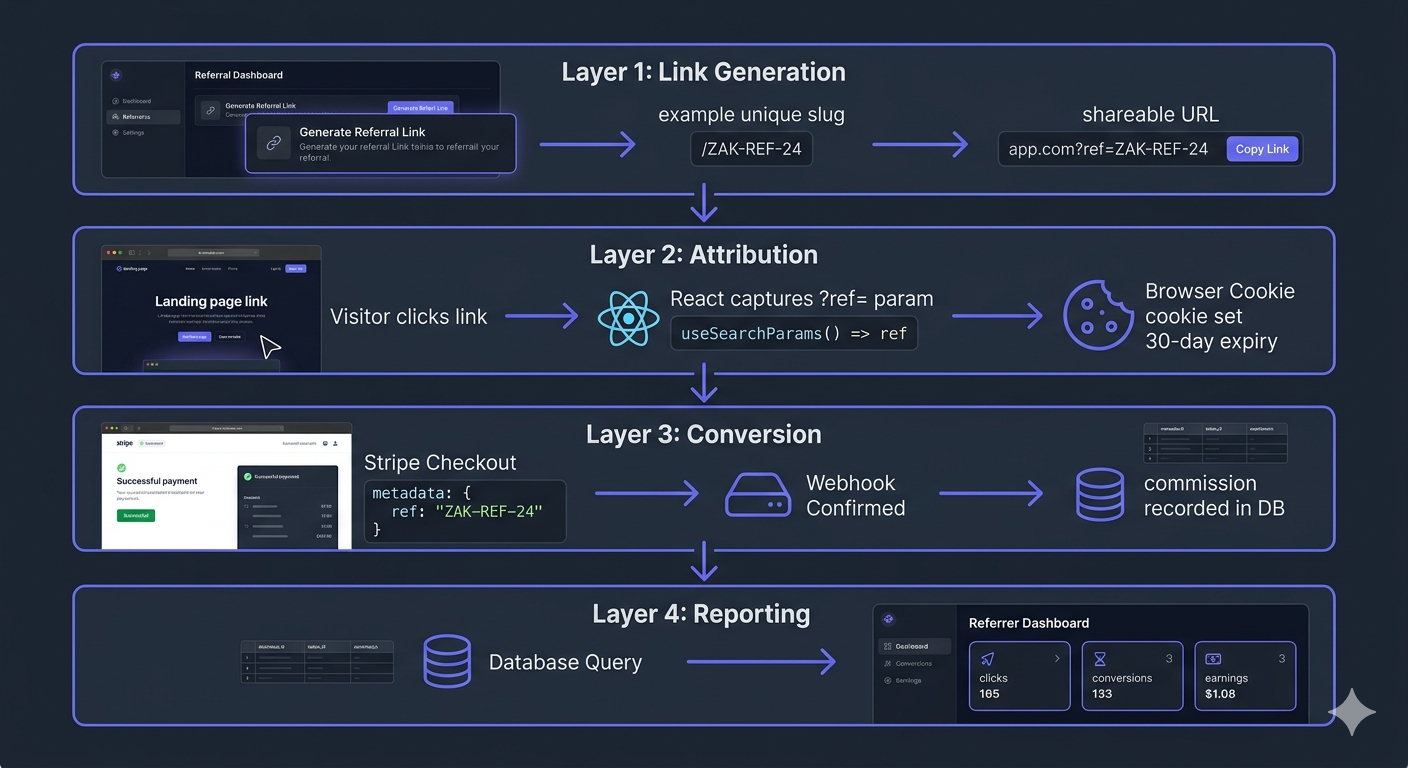
A React referral system has four distinct layers:
- Link generation — creating unique referral links per user
- Attribution — capturing the referral param and persisting it through to checkout
- Conversion — recording the conversion server-side via webhook
- Reporting — surfacing referral performance back to the referrer
Layer 1: Referral Link Generation in React
Every user needs a unique, stable referral slug. Generate it at signup and store it alongside their user record. Don’t generate it on-demand — a slug that changes breaks any links the user has already shared.
// hooks/useReferralLink.ts
import { useMemo } from 'react';
import { useUser } from '@/hooks/useUser'; // Your auth hook

export function useReferralLink() {
const { user } = useUser();

const referralLink = useMemo(() => {
  if (!user?.referralSlug) return null;
  const baseUrl = process.env.NEXT_PUBLIC_APP_URL ?? window.location.origin;
  return `${baseUrl}?ref=${user.referralSlug}`;
}, [user?.referralSlug]);

    return { referralLink };
}// components/ReferralLinkCard.tsx
'use client';
import { useState } from 'react';
import { useReferralLink } from '@/hooks/useReferralLink';
export function ReferralLinkCard() {
const { referralLink } = useReferralLink();
const [copied, setCopied] = useState(false);
async function handleCopy() {
if (!referralLink) return;
await navigator.clipboard.writeText(referralLink);
setCopied(true);
setTimeout(() => setCopied(false), 2000);
}
if (!referralLink) return null;
return (
<div className="rounded-xl border border-slate-200 bg-white p-6">
<h3 className="mb-1 text-sm font-bold text-slate-900">
Your Referral Link
</h3>
<p className="mb-4 text-xs text-slate-500">
Share this link and earn 20% of every customer you refer — recurring.
</p>
<div className="flex items-center gap-2">
<code className="flex-1 truncate rounded-lg bg-slate-50 px-3 py-2 text-xs text-slate-700 border border-slate-200">
{referralLink}
</code>
<button
onClick={handleCopy}
className="shrink-0 rounded-lg bg-indigo-600 px-4 py-2 text-xs font-bold text-white transition-colors hover:bg-indigo-500"
>
{copied ? 'Copied!' : 'Copy'}
</button>
</div>
</div>
);
}Slug Generation Strategy on the Backend
// lib/referral/generate-slug.ts
import { customAlphabet } from 'nanoid';

// Alphanumeric only, no ambiguous characters (0, O, I, l)
const generateId = customAlphabet('23456789ABCDEFGHJKLMNPQRSTUVWXYZabcdefghjkmnpqrstuvwxyz', 8);

  export function generateReferralSlug(username?: string): string {
    if (username) {
      // Use username if available and valid, fall back to random ID
      const cleaned = username.toLowerCase().replace(/[^a-z0-9-]/g, '').slice(0, 20);
      if (cleaned.length >= 3) return cleaned;
    }
    return generateId();
  }
Layer 2: Attribution — Capturing the Referral in React
When a visitor arrives via a referral link, capture the ?ref= parameter immediately and persist it in a cookie. This needs to happen before anything else — before the user reads the landing page, before they navigate to a different section, before the session has any chance to lose the parameter.
// components/ReferralTracker.tsx
'use client';

  import { useEffect } from 'react';
  import { useSearchParams } from 'next/navigation';

  const COOKIE_NAME = 'affiliate_ref';
  const COOKIE_MAX_AGE = 60 * 60 * 24 * 30; // 30 days

  function isValidSlug(slug: string): boolean {
    return /^[a-zA-Z0-9][a-zA-Z0-9-]{1,39}$/.test(slug);
  }

  function getCookie(name: string): string | null {
    const match = document.cookie.match(new RegExp(`(^| )${name}=([^;]+)`));
    return match ? decodeURIComponent(match[2]) : null;
  }

  function setCookie(name: string, value: string, maxAge: number): void {
    document.cookie = [
      `${name}=${encodeURIComponent(value)}`,
      `max-age=${maxAge}`,
      'path=/',
      'SameSite=Lax',
      process.env.NODE_ENV === 'production' ? 'Secure' : '',
    ]
      .filter(Boolean)
      .join('; ');
  }

  export function ReferralTracker() {
    const searchParams = useSearchParams();

    useEffect(() => {
      const ref = searchParams.get('ref');
      if (!ref || !isValidSlug(ref)) return;

      // First-click attribution — don't overwrite if already set
      if (getCookie(COOKIE_NAME)) return;

      setCookie(COOKIE_NAME, ref, COOKIE_MAX_AGE);
    }, [searchParams]);

    return null;
  }
Mount this in your root layout, wrapped in Suspense:
// app/layout.tsx
import { Suspense } from 'react';
import { ReferralTracker } from '@/components/ReferralTracker';

export default function RootLayout({ children }: { children: React.ReactNode }) {
return (
  <html lang="en">
    <body>
      <Suspense fallback={null}>
        <ReferralTracker />
      </Suspense>
      {children}
    </body>
  </html>
);
}
useSearchParams() in the App Router requires the component to be wrapped in Suspense or it will throw during static rendering. The fallback= means no UI change — the tracker is invisible to the user.
Handling the OAuth Signup Gap
The most common attribution failure in React referral systems is the OAuth flow. When a user clicks a referral link then signs up via Google OAuth:
- They land on your page — cookie set ✅
- They click “Sign up with Google” — redirect to Google
- Google redirects back to your callback URL — the
?ref=param is gone - Cookie is still there ✅ — attribution survives
The cookie persists through OAuth redirects as long as the callback URL is on your domain. The only failure case is if your OAuth callback clears cookies or redirects to a subdomain — check this specifically in your auth implementation.
Layer 3: Conversion — Stripe Integration
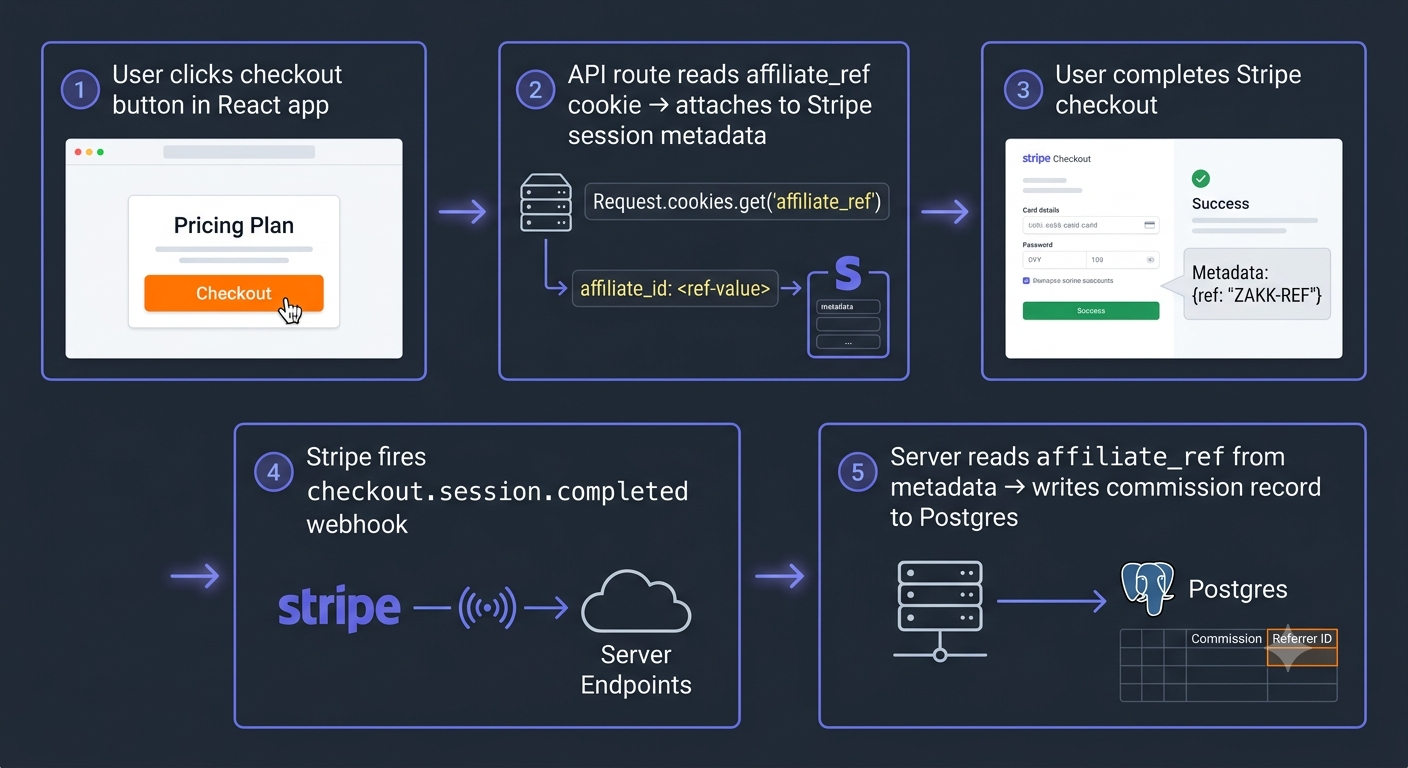
When a user initiates checkout, read the referral cookie server-side and attach it to the Stripe session as metadata. The conversion is then confirmed via webhook, not the client-side success page.
// app/api/checkout/route.ts
import { NextRequest, NextResponse } from 'next/server';
import Stripe from 'stripe';

const stripe = new Stripe(process.env.STRIPE_SECRET_KEY!, {
apiVersion: '2024-11-20',
});

  export async function POST(request: NextRequest): Promise<NextResponse> {
    const affiliateRef = request.cookies.get('affiliate_ref')?.value ?? null;

    const session = await stripe.checkout.sessions.create({
      mode: 'subscription',
      line_items: [{ price: process.env.STRIPE_PRICE_ID!, quantity: 1 }],
      success_url: `${process.env.NEXT_PUBLIC_APP_URL}/dashboard?session_id={CHECKOUT_SESSION_ID}`,
      cancel_url: `${process.env.NEXT_PUBLIC_APP_URL}/pricing`,
      metadata: {
        affiliate_ref: affiliateRef ?? '',
      },
      // Attach to subscription for recurring commission tracking
      ...(affiliateRef && {
        subscription_data: {
          metadata: { affiliate_ref: affiliateRef },
        },
      }),
    });

    return NextResponse.json({ url: session.url });
}// app/api/webhooks/stripe/route.ts
import { NextRequest, NextResponse } from 'next/server';
import Stripe from 'stripe';
import { db } from '@/lib/db';
const stripe = new Stripe(process.env.STRIPE_SECRET_KEY!, {
apiVersion: '2024-11-20',
});
export async function POST(request: NextRequest): Promise<NextResponse> {
const body = await request.text();
const sig = request.headers.get('stripe-signature');
if (!sig) return NextResponse.json({ error: 'No signature' }, { status: 400 });
let event: Stripe.Event;
try {
event = stripe.webhooks.constructEvent(body, sig, process.env.STRIPE_WEBHOOK_SECRET!);
} catch {
return NextResponse.json({ error: 'Invalid signature' }, { status: 400 });
}
if (event.type === 'checkout.session.completed') {
const session = event.data.object as Stripe.Checkout.Session;
const ref = session.metadata?.affiliate_ref;
if (ref && session.payment_status === 'paid') {
// Idempotency guard
const exists = await db.referralConversion.findUnique({
where: { stripeSessionId: session.id },
});
if (!exists) {
await db.referralConversion.create({
data: {
referralSlug: ref,
stripeSessionId: session.id,
stripeCustomerId: session.customer as string,
amountCents: session.amount_total ?? 0,
commissionCents: Math.floor((session.amount_total ?? 0) * 0.2),
status: 'pending',
convertedAt: new Date(),
},
});
}
}
}
// Recurring commissions on subscription renewals
if (event.type === 'invoice.payment_succeeded') {
const invoice = event.data.object as Stripe.Invoice;
if (invoice.billing_reason !== 'subscription_cycle') {
return NextResponse.json({ received: true });
}
const sub = await stripe.subscriptions.retrieve(invoice.subscription as string);
const ref = sub.metadata?.affiliate_ref;
if (ref && invoice.amount_paid) {
await db.referralCommission.create({
data: {
referralSlug: ref,
stripeInvoiceId: invoice.id,
amountCents: invoice.amount_paid,
commissionCents: Math.floor(invoice.amount_paid * 0.2),
status: 'pending',
paidAt: new Date(),
},
});
}
}
return NextResponse.json({ received: true });
}
Layer 4: The Referrer Dashboard in React
The dashboard is what keeps referrers motivated. Without visibility into their performance, sharing drops off within weeks. This is the feedback loop that sustains the referral program long-term.
// components/ReferralDashboard.tsx
'use client';

  import { useQuery } from '@tanstack/react-query';

  interface ReferralStats {
    totalClicks: number;
    totalSignups: number;
    totalConversions: number;
    pendingCommissionCents: number;
    paidCommissionCents: number;
    recentConversions: {
      id: string;
      amountCents: number;
      commissionCents: number;
      status: string;
      convertedAt: string;
    }[];
  }

  async function fetchReferralStats(): Promise<ReferralStats> {
    const res = await fetch('/api/referral/stats');
    if (!res.ok) throw new Error('Failed to fetch referral stats');
    return res.json();
  }

  function formatCents(cents: number): string {
    return new Intl.NumberFormat('en-US', {
      style: 'currency',
      currency: 'USD',
    }).format(cents / 100);
  }

  export function ReferralDashboard() {
    const { data, isLoading, error } = useQuery({
      queryKey: ['referral-stats'],
      queryFn: fetchReferralStats,
      staleTime: 60_000,
    });

    if (isLoading) {
      return (
        <div className="grid grid-cols-2 gap-4 sm:grid-cols-4">
          {Array.from({ length: 4 }).map((_, i) => (
            <div key={i} className="h-24 animate-pulse rounded-xl bg-slate-100" />
          ))}
        </div>
      );
    }

    if (error || !data) {
      return <p className="text-sm text-slate-500">Could not load referral stats. Try refreshing.</p>;
    }

    const stats = [
      { label: 'Clicks', value: data.totalClicks.toLocaleString() },
      { label: 'Signups', value: data.totalSignups.toLocaleString() },
      { label: 'Conversions', value: data.totalConversions.toLocaleString() },
      { label: 'Pending Earnings', value: formatCents(data.pendingCommissionCents), highlight: true },
    ];

    return (
      <div className="space-y-6">
        <div className="grid grid-cols-2 gap-4 sm:grid-cols-4">
          {stats.map((stat) => (
            <div
              key={stat.label}
              className={`rounded-xl border p-4 ${stat.highlight ? 'border-indigo-200 bg-indigo-50' : 'border-slate-200 bg-white'}`}
            >
              <p className="text-xs font-medium text-slate-500">{stat.label}</p>
              <p className={`mt-1 text-2xl font-black ${stat.highlight ? 'text-indigo-700' : 'text-slate-900'}`}>
                {stat.value}
              </p>
            </div>
          ))}
        </div>

        {data.recentConversions.length > 0 && (
          <div className="rounded-xl border border-slate-200 bg-white">
            <div className="border-b border-slate-100 px-4 py-3">
              <h4 className="text-sm font-bold text-slate-900">Recent Conversions</h4>
            </div>
            <div className="divide-y divide-slate-100">
              {data.recentConversions.map((conversion) => (
                <div key={conversion.id} className="flex items-center justify-between px-4 py-3">
                  <div>
                    <p className="text-xs font-medium text-slate-700">
                      {formatCents(conversion.amountCents)} sale
                    </p>
                    <p className="text-xs text-slate-400">
                      {new Date(conversion.convertedAt).toLocaleDateString()}
                    </p>
                  </div>
                  <div className="text-right">
                    <p className="text-xs font-bold text-indigo-600">
                      +{formatCents(conversion.commissionCents)}
                    </p>
                    <span className={`text-xs font-medium capitalize ${conversion.status === 'paid' ? 'text-emerald-600' : 'text-amber-600'}`}>
                      {conversion.status}
                    </span>
                  </div>
                </div>
              ))}
            </div>
          </div>
        )}
      </div>
    );
  }
The Business Metrics That Tell You If It’s Working
Referral Rate
Referral Rate = Customers acquired via referral / Total new customers
Healthy range: 15–25% for a well-run SaaS referral program. Below 10% — the incentive is too weak or the program isn’t visible enough. Above 30% early on — you’re in a tight-knit community, lean into it hard.
Referrer Activation Rate
Activation Rate = Users who shared at least once / Users with a referral link
If less than 20% of users with referral links ever share them, the reward isn’t compelling or the link is too hard to find. Add the referral link to your onboarding flow, post-payment confirmation page, and a persistent dashboard widget.
Viral Coefficient (K-Factor)
K = Invites sent per user × Conversion rate of those invites
- K < 0.1: Referral program has minimal impact on growth
- K = 0.3–0.5: Meaningful contribution, cuts CAC materially
- K > 1.0: Viral growth — user base grows without external acquisition
Most SaaS products land between 0.1–0.3. Moving from 0.1 to 0.2 cuts your effective CAC in half. That’s the goal — not virality, but meaningful CAC reduction.
Referred User LTV vs. Organic User LTV
Referred users consistently show 15–25% higher LTV in SaaS products. They arrive with social proof from someone they trust, lower skepticism, and higher intent. If your referred users are churning faster than organic users, the referral targeting is wrong — your referrers are sending unqualified traffic.
The Infrastructure Gap
The React components and API routes above handle attribution and conversion recording cleanly. What they don’t give you:
- A referrer-facing portal with their full history, not just the in-app widget
- Admin payout management — approving commissions, marking them as paid, handling disputes
- Email notifications when commissions are earned or paid
- Multi-campaign support — different commission rates for different referral programs
- Coupon code tracking alongside link-based tracking
Building all of that adds 8–12 weeks of engineering to what started as “a referral program.” That’s the real scope. The attribution logic is 2 days. The surrounding product is months.
RefearnApp is an open-source, self-hosted affiliate tracking platform that ships the affiliate portal, commission engine, payout tracking, and coupon code tracking so you don’t build it from scratch. For a deeper look at how coupon-based tracking works alongside link tracking, see our guide on tracking Stripe coupons for affiliates.
Conclusion & Next Steps
A production referral system in React has four layers — link generation, cookie attribution, Stripe webhook conversion, and a referrer dashboard. The code above covers all four. The business decisions — incentive structure, attribution window, who can refer — determine whether anyone actually uses it.
- Use double-sided incentives for self-serve SaaS — both parties win immediately
- Set a 30-day cookie window minimum — SaaS evaluations take time
- Use first-click attribution — the first referrer gets the credit, never overwrite the cookie
- Confirm conversions via Stripe webhook only — never trust the client-side success page
- Track your K-factor monthly — even moving from 0.1 to 0.2 cuts CAC in half
Ready to Build Without Subscription Limits?
RefearnApp is fully open-source, self-hostable, and AGPL-3.0 licensed. You can deploy it completely free on your own infrastructure using Coolify or follow our step-by-step setup walkthrough.
Self-Hosted Open Source
Deploy directly on your own VPS via Coolify. Enjoy 100% data ownership.
Managed RefearnApp Cloud
Get up and running instantly. Skip the manual environment configuration, provisioning, and setup tasks with a fully turnkey, zero-config deployment.
Try Managed Cloud